Step 4: Enjoy Your Music!
If everything went smoothly in the last step, the music on your CD has been converted to MP3 files on your hard drive. Now you can switch to the Library in Windows Media Player to listen to them.
Click on the "Library" tab and the album you just ripped should be displayed automatically. Click the Play button to listen to your new MP3 files.
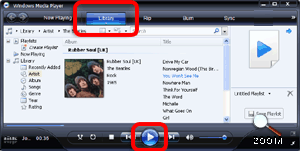 | | Windows Media Player Library Screen Circled: "Library" tab shows this screen. The Play button (sideways triangle) plays the selected album. |
Navigating the Library
The Windows Media Player Library will automatically show any CD that rip. The Library gives you numerous ways to browse your MP3 collection. You can browse by Artist, Genre, Album Name, Year and more.
Double-click on any item in the left pane to begin playing it. The "Now Playing" list on the right shows the tracks being played. Use the controls on the bottom left to pause, skip to the next or previous song, mute and set the volume.
Tip: Double-click the top-most item in the left pane: "All Music." This queues up your entire MP3 collection.
Transferring MP3s to Portable Devices (iPods, etc)
You can transfer your MP3 collection to an iPod or other portable music player. The best way to do it is using whatever program came with the device. The key is knowing where your MP3 files are stored on your hard drive...
Where are My MP3 Files?
In Step 2 you have the option of specifying where to store your MP3 files. If you kept the default folder, you can find them by browsing to My Documents and then My Music.
|
|
Navigation
Ripping CDs using Windows Media Player
|
Originally Published: Saturday, September 17, 2005, 5:00 PM PT Last Updated: Monday, June 27, 2011, 10:50 PM PT Version 1
Topic Guide
| You are viewing the Knowzy topic: |
|
|
Instructional Guide 3 Items
Step 4: Enjoy Your Music! (Viewing)
Multimedia and Tools 1 Item
|